Interactive maps can be a powerful educational tool, helping teachers bring geography, history, science, and other subjects to life. With Pinmaps.net, educators can create and share interactive maps that allow students to explore locations, participate in classroom activities, and learn through hands-on experiences. Best of all, students can add pins to shared maps without creating an account or providing an email address.
Adding Map Pins Is Now Easier Than Ever
We recently received valuable feedback from an educator who was using Pinmaps.net with students:
"Drop and pin without so many windows. My students were confused with having to label everything."
We listened and made an improvement!
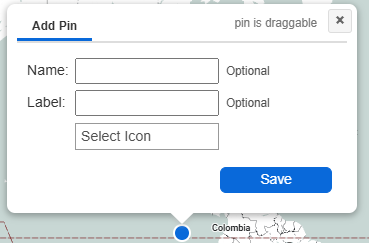
Now, when students or other anonymous users add pins to a shared map, the process is much simpler. Just drop a pin on the map and click Save. That's it! No complicated forms or required labels.
For those who want to add more information, there are two optional fields:
-
Name: Give the location a name.
-
Label: Add a short label to identify the pin.
Students can even drag the pin to adjust its location before saving it. This makes classroom mapping activities more intuitive, especially for younger students or those using interactive maps for the first time.
Creative Ways Teachers Can Use Pinmaps.net
Pinmaps.net can support a variety of educational activities across different subjects.
Geography lessons: Students can identify countries, cities, landmarks, rivers, or other geographic features by placing pins directly on a map.
History projects: Teachers can create maps of historical events, important locations, or significant journeys, allowing students to visualize where history happened.
Science and environmental studies: Students can mark ecosystems, natural resources, weather events, or environmental observations on a shared map.
Collaborative classroom activities: Teachers can share a map and enable the option to allow non-account holders to add pins, making it easy for students to participate without individual accounts.
These activities encourage participation, geographic awareness, and visual learning while keeping the technology simple.
Create an Interactive Map for Your Classroom
Whether you're teaching elementary school students or working with more advanced learners, Pinmaps.net provides a convenient way to incorporate interactive maps into your lessons.
Create a map, share it with your students, and let them explore and add locations with just a few clicks.
Create a Free Interactive Map for Your Classroom with Pinmaps.net and discover how easy educational mapping can be.