If you need to share a map with locations, Pinmaps.net makes it easy to create an interactive map and share it with others. You don't need to create an account or even provide an email address to get started. Simply click Create a Map, add your locations as pins, and customize your map. Once your map is ready, you can share it with others using a simple link.
Creating a map can be useful for many different purposes. You can create a travel map to share vacation destinations, a business map showing multiple office locations, an event map with important places for attendees, or a simple map showing a collection of places you want someone else to see. You can add locations individually or use other Pinmaps features to create your map more efficiently.
Choose How People Can Use Your Map
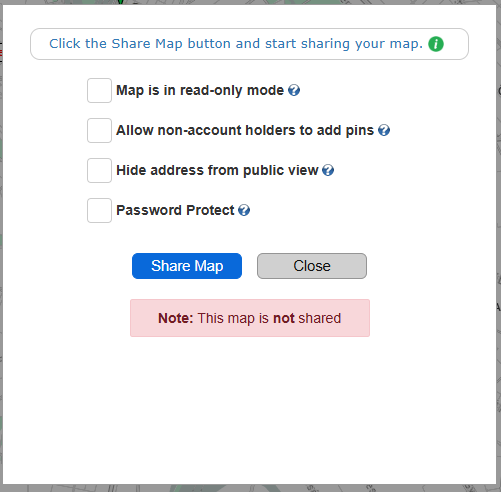
When you share your map, you can decide how much access other people have. Map is in read-only mode allows people to view your locations without making changes to the map. This is useful when you simply want to share information with friends, customers, coworkers, or visitors.
If you want other people to contribute locations, you can select Allow non-account holders to add pins. This lets people add pins to your map without requiring them to create a Pinmaps.net account. It's a convenient option for collaborative maps, group trips, events, and collecting locations from multiple people.
You can also use Password Protect when you want to restrict access to your map. This gives you an additional way to control who can view or interact with your shared map.
Create and Share Your Map
You don't have to spend time setting up an account before you know whether Pinmaps.net is right for you. Create a map, add your locations, choose your sharing options, and send the link. Your map can be viewed from a web browser, making it easy to share with people on computers, phones, and other devices.
Ready to create your own map? Create a Free Map with Pinmaps.net and start adding your locations today.